logo
Home > Products >
Transformer Tester
>
DC Resistance Tester with USB Disks and LCD Display

DC Resistance Tester with USB Disks and LCD Display

Product Details:
Place of Origin: Xi'an Shaanxi China
Brand Name: XZH TEST
Certification: ISO CE
Model Number: XHZ1020A
Detail Information
Place of Origin:
Xi'an Shaanxi China
Brand Name:
XZH TEST
Certification:
ISO CE
Model Number:
XHZ1020A
Display Size:
7.0 Inches
Resolution:
1024×600
Maximum Output Current:
50A
Highlight:

High Light

Highlight:

USB Disks Transformer Tester

,

Auto Current Range DC Resistance Tester

,

LCD Display Transformer Tester

Trading Information
Minimum Order Quantity:
1set
Packaging Details:
wooden packaging
Delivery Time:
5-8 work days
Payment Terms:
T/T
Supply Ability:
3000unit/year
Product Description

XHZ1020A


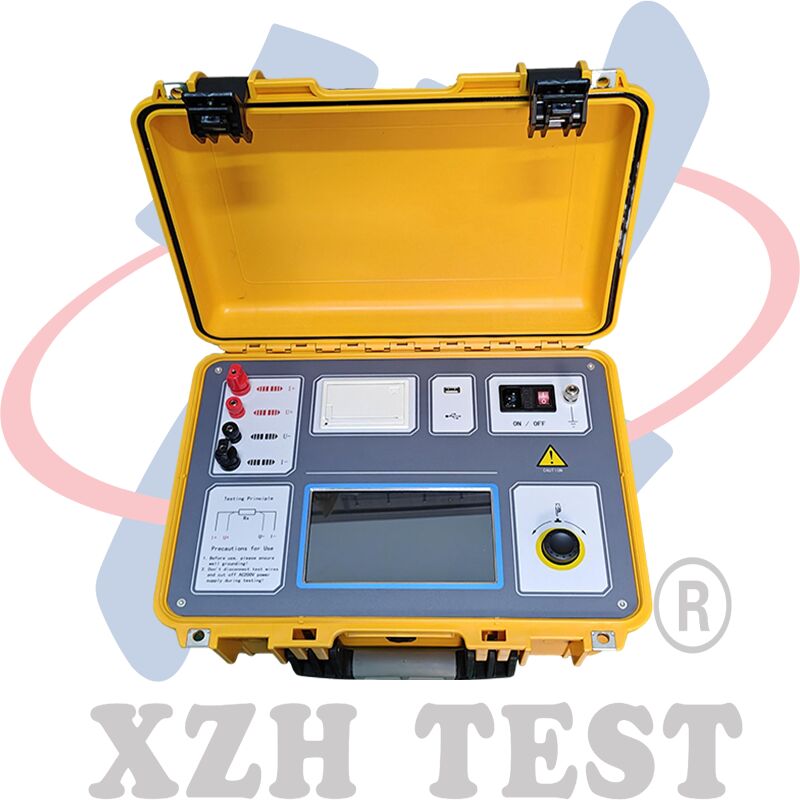
As the heart of power systems, transformers require long-term reliable operation to ensure overall grid stability and reliability. DC resistance testing is non-negotiable for transformers (semi-finished or finished) during delivery, installation, and handover, and is a key step in power sector preventive testing. It uncovers manufacturing defects such as coil material problems, poor welding, loose connections, strand loss, or breaks, plus post-installation hidden risks. Designed to meet the need for quick transformer DC resistance measurement, this tester capitalizes on our technical expertise. It features a large true-color high-res LCD, touch control, and a jog dial for easy on-site use; Chinese menu prompts make operation simple and intuitive. The tester delivers fast, high-accuracy results across a wide measurement range.


Main Technical Indicators

DC Resistance Tester with USB Disks and LCD Display 0


Panel Description

DC Resistance Tester with USB Disks and LCD Display 1

DC Resistance Tester with USB Disks and LCD Display 2

This section only describes 50A/40A panel in detail. For 20A model, this section can be referred to.

1. Test wire terminals.

2. Wiring illustration and precautions.

3. Capacitive touch screen.

Display size: 7.0 inches; Resolution: 1024×600.

4. Jog dial.

It can be used to operate all functions of the instrument.

5. Emergency stop button. (This feature is not available on the 20A model)
Tests will be stopped immediately once the emergency stop button is pressed during tests. After finishing using it, remember to reset it for next time use.

6. Power On/Off button.
Press the button for about 2s and the instrument will be started up.

7. Grounding terminal and indicator light. (This feature is not available on the 20A model)
The instrument must be firmly grounded. Remove all paints or rusts on the grounding area if there are. Please check the ground wire if the indicator light is on.

8. Overvoltage indicator light. (This feature is not available on the 20A model)
When the indicator light is red, it indicates the input power is over what the tester allows.

9. USB Interface.
Its used to insert external USB disk to store test data.  Insert FAT or FAT32 format USB disk. During storage, dont take it out.

10. Printer

Its used to print test reports.